How to create a schema in mongoose library.
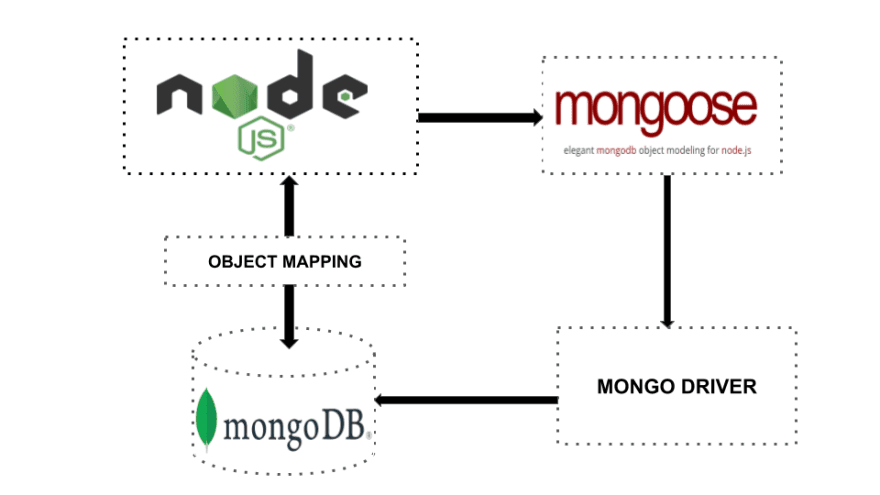
Mongoose is an Object Document Mapping (ODM) library that provides a straight-forward, schema-based solution to model your application data in MongoDB. With Mongoose, you can define the shape of your documents and the data types of each field, as well as pre-save and post-save hooks to execute custom logic.
To create a schema in Mongoose
you first need to install the library using the following command:
npm install mongoose
Then, you can define a schema by creating a new instance of the
mongoose.Schema
class and defining the fields that you want in your schema. For example:
const mongoose = require('mongoose');
const schema = new mongoose.Schema({
  name: String,
  age: Number,
  email: String
});
This creates a schema with three fields: name, age, and email. You can specify the data type of each field using one of the built-in types (e.g. String, Number, Date, etc.) or a custom type that you define.
Once you have defined your schema, you can then use it to create a model. A model is a class that represents a collection in the database and provides a way to create, retrieve, update, and delete documents. To create a model, you can use the mongoose.model function and pass in the name of your model and the schema that you defined earlier. For example:
const User = mongoose.model('User', schema);
This creates a User model that you can use to interact with the users collection in your database. You can then use the model's methods (e.g. find, create, update, etc.) to query and modify the data in the collection.
In summary, creating a schema in Mongoose involves the following steps:
- Install Mongoose using
npm install mongoose. - Define a schema using the
mongoose.Schemaclass and specify the fields that you want in your schema. - Create a model using the
mongoose.modelfunction and pass in the name of your model and the schema that you defined. - Use the model's methods to query and modify the data in the collection.

Ravi Sharma
As a self-taught full-stack MERN developer, I have learned to work with the MERN stack, which includes MongoDB, Express.js, React, and Node.js technologies. I am proficient in front-end and back-end development and can build complete web applications from start to finish. I have a strong understanding of modern web development practices and am able to adapt to new technologies and methodologies as needed.